|
⇤ ← Revision 1 as of 2026-04-18 05:14:16
Size: 1211
Comment:
|
← Revision 2 as of 2026-04-18 05:21:10 ⇥
Size: 1335
Comment:
|
| Deletions are marked like this. | Additions are marked like this. |
| Line 3: | Line 3: |
{{attachment:2026-04-17_22-16_1.png}} |
|
| Line 7: | Line 9: |
| * Please input the address (IP or hostname) which you'd like to test at Host textarea. Then press Enter key to start. | * Please input the address (IP or hostname) which you'd like to test at Host textarea. Then press Enter key to start. <<BR>>{{attachment:2026-04-17_22-16.png}} |
| Line 15: | Line 17: |
{{attachment:2026-04-17_22-18.png}} |
How to use Mudfish MTR
Mudfish MTR is a built-in tool to perform Matt's Traceroute Feature. And it's found under "Advanced -> Matt's Traceroute" menu of Mudfish Launcher.
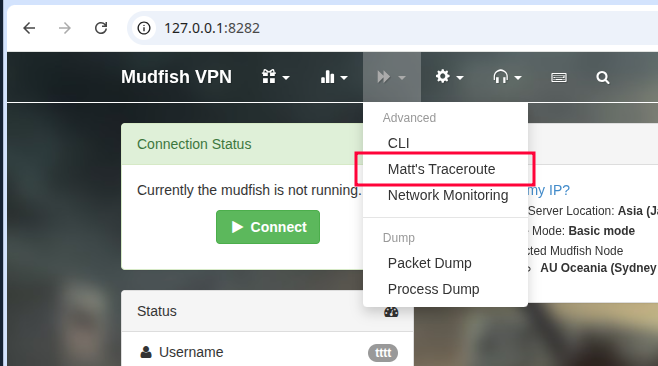
How to use
For details, please check Matt's Traceroute Feature link.
Please input the address (IP or hostname) which you'd like to test at Host textarea. Then press Enter key to start.
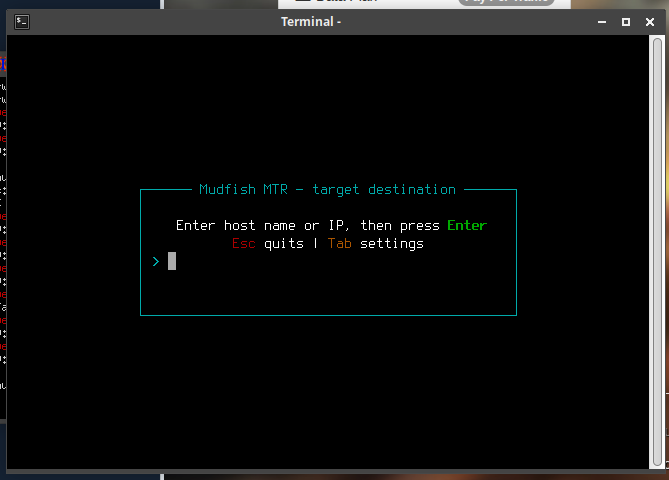
- When it started, every second it'll try to discover routers and test the discovered routers. It measures the following things:
- How many tests to each router.
- About the packet loss rate.
- RTT min, avg, max, stddev.
- Please keep it running at least 1 minute (60 seconds)
How to read
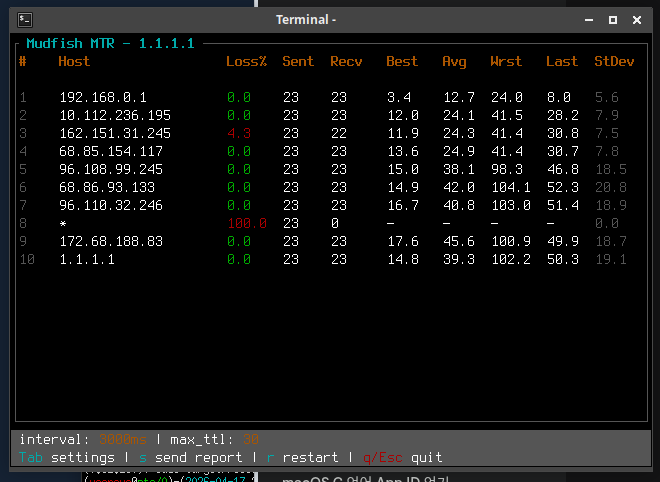
- You should focus on the rate of packet loss. If the packet loss rate of a specific host is 100%, please ignore it because it's not meaningful. Normally it's caused by that the router doesn't respond at all.
- If the rate of packet loss is between 1 % and 99 %, you should check which hop is in trouble.